 Claude Usage
Two rings. One glance.
No more /usage.
Claude Code and Claude subscribers keep bumping into the 5-hour session limit and
the weekly limit with no way to check without running /usage
or opening a browser tab. Claude Usage reads the same OAuth token Claude Code already stores in your
Keychain, calls Anthropic's own usage endpoint, and renders two rings in your menu bar — always
there, always current.
The same token. The same endpoint. Just always visible.
Claude Usage doesn't have its own account, its own server, or its own login. It reads a token
Claude Code already stored on your Mac, and asks Anthropic the same question /usage
does — it just asks it in the background, every 15 minutes, and shows you the answer without asking.
Token, already there
Claude Code stores your OAuth token in the macOS Keychain, under Claude Code-credentials.
One direct call
Claude Usage reads that token and calls GET /api/oauth/usage — straight to Anthropic, no server in between.
Same numbers as /usage
The 5-hour and weekly utilization figures come back — exactly what Claude Code's own /usage command shows.
Two rings, in the menu bar
No terminal, no browser tab — just glance up. Refreshes on click, on wake, and every 15 minutes.
One request. No middleman.
This uses an internal, undocumented Anthropic endpoint — the same one Claude Code's CLI calls for /usage — so it could change or break without notice. Nothing about it is proxied through a server Claude Usage controls.
Nothing leaves your Mac except Anthropic's own API.
This app reads a Keychain item that belongs to a different app, so it earns extra scrutiny. Here's exactly what that access is used for, and nothing more.
The only network call Claude Usage makes is to Anthropic's own API — there is no analytics service, no crash reporter, no third-party server of any kind sitting between your Mac and Anthropic. It doesn't read your prompts, your code, or your conversation history; it only asks for the utilization numbers /usage already shows you.
Reading another app's Keychain item is a cross-app access macOS gates behind a confirmation prompt — one that doesn't stay silenced forever for a self-signed app. Claude Usage's answer: cache the token into its own Keychain item, so normal refreshes never touch Claude Code's item, or ask again.
Small surface. No surprises.
One menu bar icon, two rings, the numbers you'd otherwise have to go ask for.
Two rings, one glance
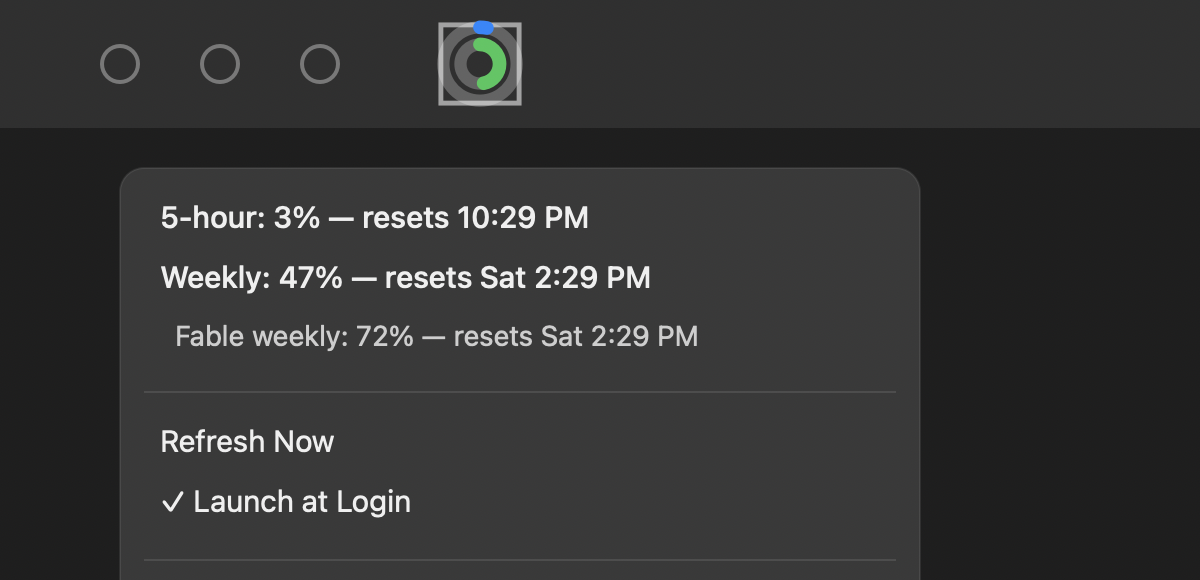
Outer ring is your 5-hour session limit, inner ring is your weekly limit — both live in the menu bar, all the time.
Turns orange, then red
Each ring shifts color as you close in on its limit, so you notice before you're cut off mid-session.
Exact numbers on click
Click the icon for precise percentages and reset times — not just a rough visual read.
Per-model caps, tracked separately
Plans with model-specific weekly caps — like Sonnet or Fable — show each one on its own line, not folded into one number. e.g. Fable weekly
Always current
Refreshes when you click the icon, when your Mac wakes up, and quietly every 15 minutes in between.
Launch at Login, fails loudly
Opt in from the menu to start automatically at sign-in. If a background refresh ever fails, a gray ! badge tells you — quietly, not with a popup.
Stop typing /usage.
Free, open source, and honest about what it can't do.
This build isn't notarized — there's no Apple Developer account behind it — so macOS will warn about an unidentified developer on first launch. Right-click the app in Applications and choose Open to bypass that, just once. Prefer to build it yourself? Grab the source from GitHub and run ./build.sh — no Xcode project needed, just the Swift toolchain.